Naca Generator#
This tutorial shows how to create a NACA airfoil geometry generator app with visualization, using the ngsolve_webgpu python package.
We follow the steps in the Getting Started tutorial to create a new app.
Then, we import the necessary libraries and components
from ngapp.app import App
from ngapp.components import (
    Centered,
    Col,
    Heading,
    Label,
    Row,
    QSlider,
    WebgpuComponent,
)
from netgen.occ import *
from ngsolve_webgpu import *
from webgpu.camera import Camera
from .naca_geometry import occ_naca_profile
The naca type is defined by 4 digits, where the first digit is the maximum camber in percentage of the chord, the second digit is the position of the maximum camber in tenths of chord, and the last two digits are the maximum thickness in percentage of the chord. For example, the NACA 2412 airfoil has a maximum camber of 2% located at 40% of the chord length, and a maximum thickness of 12% of the chord length. Thus, we create 4 sliders to define the naca type, with initial values and ranges that make sense for airfoils.
self.camber = QSlider(
    ui_min=0,
    ui_max=9,
    ui_step=1,
    ui_model_value=2,
    ui_marker_labels=True,
    ui_markers=True,
).on_change(self.draw_profile)
self.camber_position = QSlider(
    ui_min=0,
    ui_max=90,
    ui_step=10,
    ui_model_value=40,
    ui_marker_labels=True,
    ui_markers=True,
).on_change(self.draw_profile)
self.thickness = QSlider(
    ui_min=1,
    ui_max=40,
    ui_step=5,
    ui_model_value=12,
    ui_marker_labels=True,
    ui_markers=True,
).on_change(self.draw_profile)
The arguments ui_markers and ui_marker_labels add markers and labels to the slider. To view all available options, check the QSlider documentation.
The draw_profile method is called whenever a slider value changes, and it generates the naca profile.
Setting up visualization and layout#
We use the WebgpuComponent to visualize the airfoil profile. We create a camera to have a better view of the airfoil
self.camera = Camera()
self.camera_initialized = False
self.webgpu = WebgpuComponent(id="webgpu", width="600px", height="400px")
and add a heading and label to the app
self.title = Heading("Naca Generator")
self.naca_label = Label("NACA Airfoil Generator")
Finally, we arrange the components in a layout using Row, Col, and Centered components with some custom styling
self.component = Centered(
    self.title,
    self.naca_label,
    Row(
        Col(
            Row(Label("Max Camber (%)"), self.camber),
            Row(Label("Max Camber Position (%)"), self.camber_position),
            Row(Label("Thickness (%)"), self.thickness),
            ui_style="width:600px; margin-top:50px;",
        ),
        Col(
            self.webgpu,
            ui_style="width:650px; height:450px; border:1px solid black; margin-left:50px;",
        ),
        ui_style="margin-top:50px;",
    )
)
Creating the NACA profile#
We define the draw_profile method to generate the NACA profile based on the slider values.
def draw_profile(self):
    naca_type = f"{int(self.camber.ui_model_value)}{int(self.camber_position.ui_model_value // 10)}{int(self.thickness.ui_model_value)}"
    profile = occ_naca_profile(type=naca_type)
    profile.faces.col = (88 / 255, 139 / 255, 174 / 255)
    self.naca_label.text = f"NACA {naca_type} Airfoil"
    geo = GeometryRenderer(OCCGeometry(profile, dim=2))
    self.webgpu.draw([geo], camera=self.camera)
    if not self.camera_initialized:
        pmin, pmax = self.webgpu.scene.bounding_box
        self.camera.transform.set_center(0.5 * (pmin + pmax))
        self.camera.transform.scale(0.5)
        self.camera_initialized = True
The occ_naca_profile function creates the airfoil profile using the specified naca type
def naca4(number, n):
    m = float(number[0]) / 100.0
    p = float(number[1]) / 10.0
    t = float(number[2:]) / 100.0

    a0 = +0.2969
    a1 = -0.1260
    a2 = -0.3516
    a3 = +0.2843
    a4 = -0.1036

    x = np.linspace(0.0, 1.0, n + 1)

    yt = [
        5
        * t
        * (
            a0 * sqrt(xx)
            + a1 * xx
            + a2 * pow(xx, 2)
            + a3 * pow(xx, 3)
            + a4 * pow(xx, 4)
        )
        for xx in x
    ]

    xc1 = [xx for xx in x if xx <= p]
    xc2 = [xx for xx in x if xx > p]

    if p == 0:
        xu = x
        yu = yt

        xl = x
        yl = [-xx for xx in yt]

        xc = xc1 + xc2
        zc = [0] * len(xc)
    else:
        yc1 = [m / pow(p, 2) * xx * (2 * p - xx) for xx in xc1]
        yc2 = [m / pow(1 - p, 2) * (1 - 2 * p + xx) * (1 - xx) for xx in xc2]
        zc = yc1 + yc2

        dyc1_dx = [m / pow(p, 2) * (2 * p - 2 * xx) for xx in xc1]
        dyc2_dx = [m / pow(1 - p, 2) * (2 * p - 2 * xx) for xx in xc2]
        dyc_dx = dyc1_dx + dyc2_dx

        theta = [atan(xx) for xx in dyc_dx]

        xu = [xx - yy * sin(zz) for xx, yy, zz in zip(x, yt, theta)]
        yu = [xx + yy * cos(zz) for xx, yy, zz in zip(zc, yt, theta)]

        xl = [xx + yy * sin(zz) for xx, yy, zz in zip(x, yt, theta)]
        yl = [xx - yy * cos(zz) for xx, yy, zz in zip(zc, yt, theta)]

    X = xu[::-1] + xl[1:]
    Z = yu[::-1] + yl[1:]

    return X, Z

def occ_naca_profile(type="2412", width=4, height=4, depth=0, angle=0, h=0.01):
    thanks = "The occ_naca_profile function was provided by Xaver Mooslechner. Thanks!"
    print(thanks)

    xs, ys = naca4(type, 60)
    pnts = []
    for i in range(len(xs)):
        pnts.append((xs[i], ys[i], 0))
    rect = Rectangle(width, height).Face().Move((-width / 2 + 1, -height / 2, 0))
    rect.edges.name = "outlet"
    rect.edges.Min(X).name = "inlet"
    curve = Wire(SplineApproximation(pnts))
    wing = Face(curve)
    wing.edges.name = "wall"
    wing.edges.maxh = h
    wing = wing.Rotate(Axis((0, 0, 0), Z), -angle)
    air = rect - wing
    if depth > 0:
        domain = air.Extrude(depth)
        domain.faces.Min(Z).name = "periodic"
        domain.faces.Max(Z).name = "periodic"
        domain.faces.Max(Z).Identify(
            domain.faces.Min(Z), "periodic", IdentificationType.PERIODIC
        )
        return domain
    else:
        return air
A further option is to rotate the airfold by an angle, this can be easily done by adding a slider for the angle
self.angle = QSlider(
    ui_min=0,
    ui_max=90,
    ui_step=5,
    ui_model_value=5,
    ui_marker_labels=True,
    ui_markers=True,
).on_change(self.draw_profile)
self.component = Centered(
    self.title,
    self.naca_label,
    Row(
        Col(
            Row(Label("Max Camber (%)"), self.camber),
            Row(Label("Max Camber Position (%)"), self.camber_position),
            Row(Label("Thickness (%)"), self.thickness),
            Row(Label("Angle (deg)"), self.angle),
            ui_style="width:600px; margin-top:50px;",
        ),
        Col(
            self.webgpu,
            ui_style="width:650px; height:450px; border:1px solid black; margin-left:50px;",
        ),
        ui_style="margin-top:50px;",
    )
)
and modifying the naca profile call in the draw_profile method
profile = occ_naca_profile(type=naca_type, angle=self.angle.ui_model_value)
Final State#
The final state of the app should look like this:
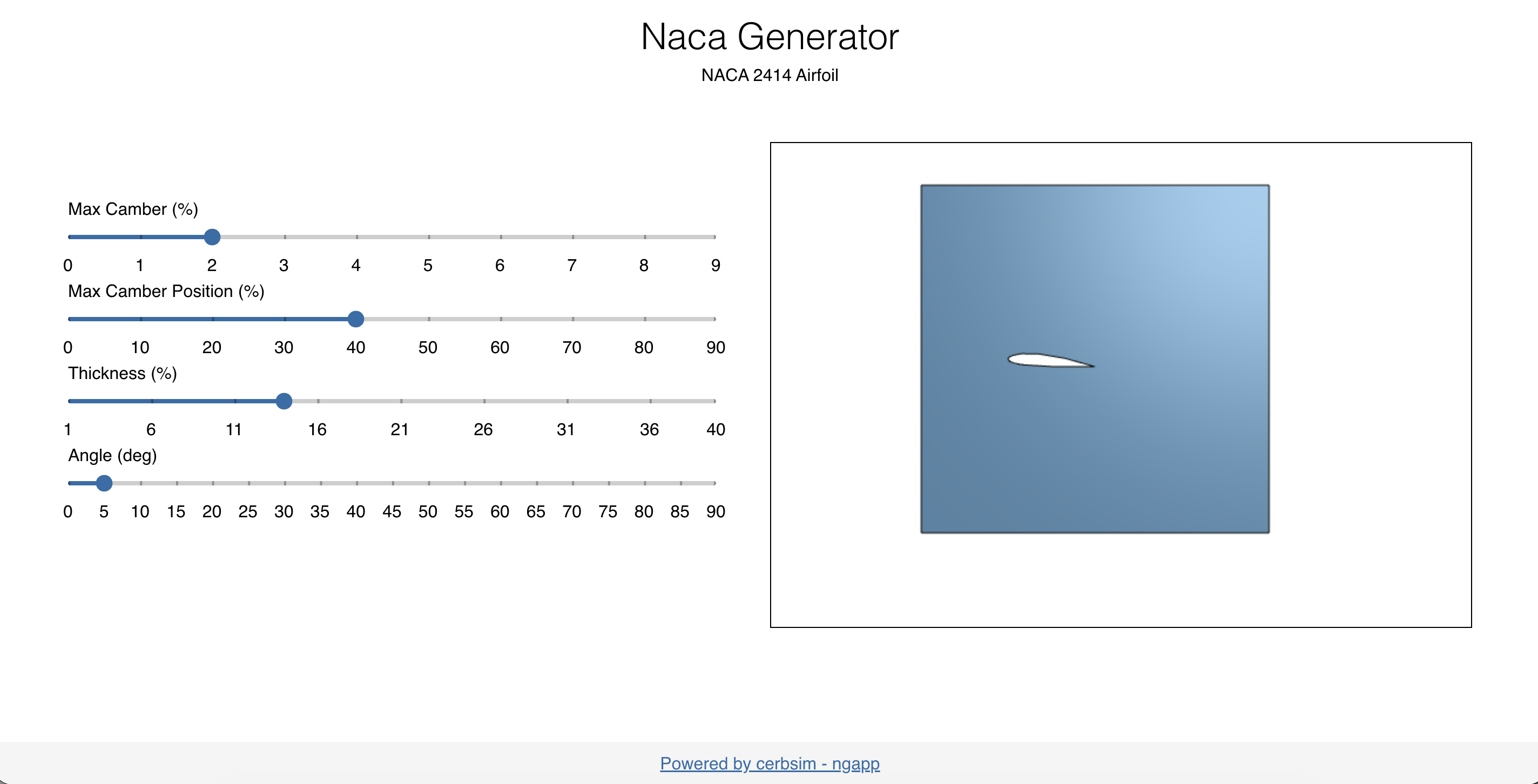
The full code can be found in nacagenerator .